10 Best Drones for Beginners with Camera for 2026
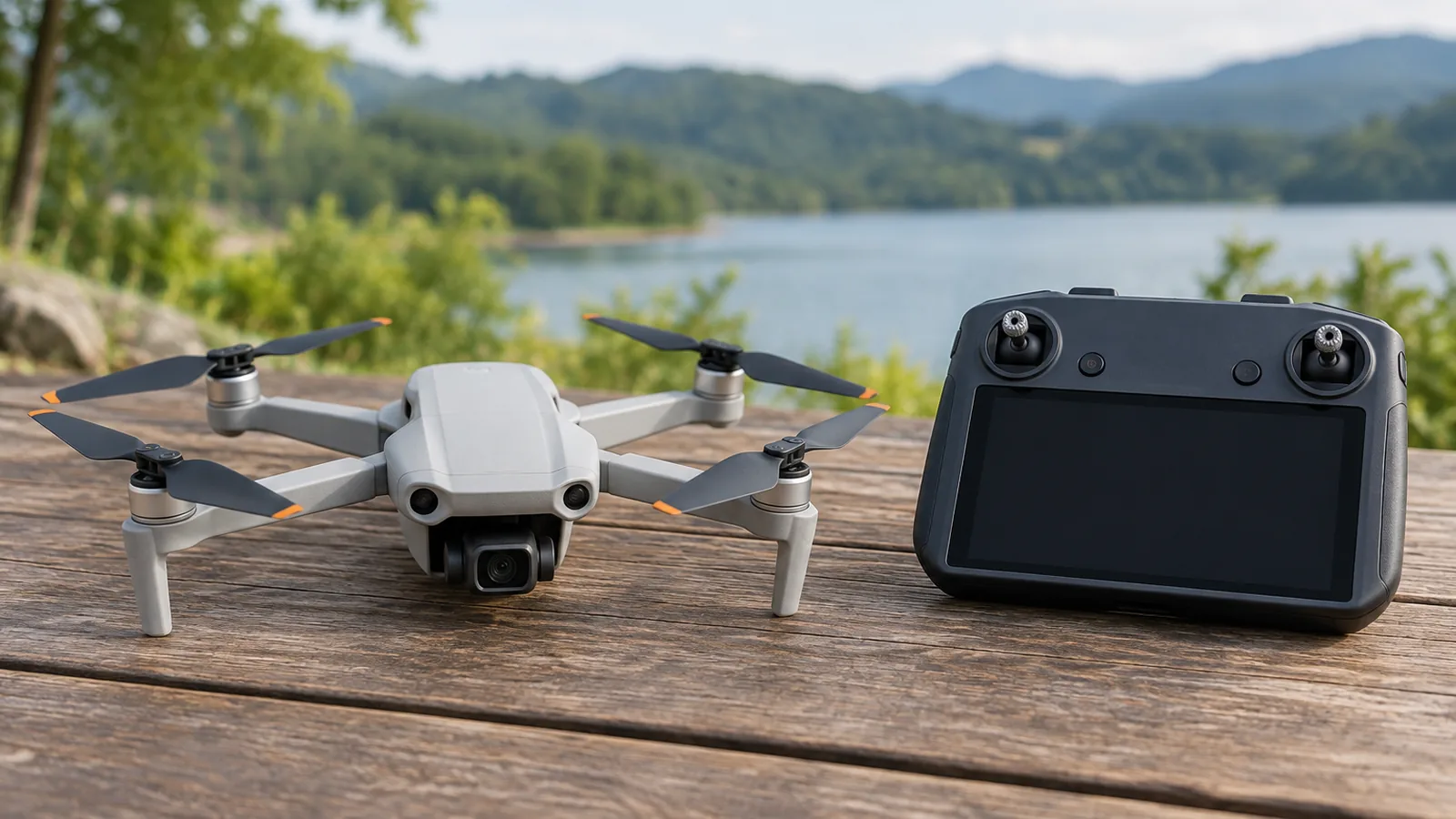
BLINORY 2K Camera Drone is the best drone for beginners with camera in this roundup, while PLEGBLE 4K Camera Drone is grouped with it as an all-rounder. For phone-free viewing, compare FPV LCD Screen Camera Drone and Brushless Screen Remote Drone; for controller playback or indoor practice, consider G3 HD Camera Drone and LCD Screen Camera Quadcopter.
UHD Screen Controller Drone and Holy Stone Mini FPV Drone suit guarded-flight needs, while 1080P Foldable Camera Drone and FLYVISTA Cool Mini Drone add foldable or flip-practice options. Choose by camera quality, flight aids, controller screen versus phone view, and stated battery life. Treat maximum flight times as claims: owners report 20–25 minutes for the DJI Mini 4K, below its 31-minute manufacturer maximum.
The comparison table summarizes flight aids, controller type, and takeoff weight.
Our top picks for drones for beginners with camera
- Best Overall: BLINORY 2K Camera Drone, for beginners practicing basic flight and casual aerial photos
- Best for Longer Flights: PLEGBLE 4K Camera Drone, for beginners seeking a lightweight camera drone with three batteries and basic flight aids
- Best for Phone-Free FPV: FPV LCD Screen Camera Drone, for beginners wanting phone-free FPV and casual camera flying
| BLINORY 2K Camera Drone | 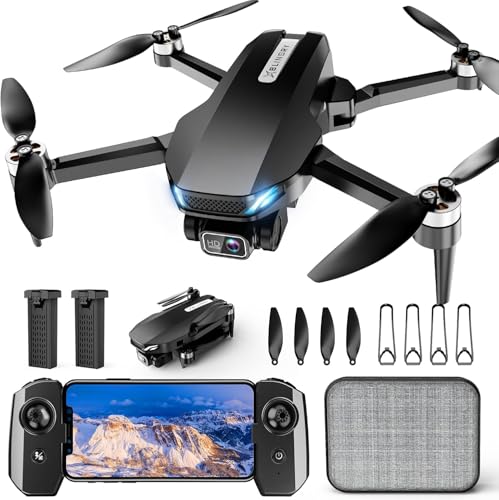 | Best Overall | Flight aids: Altitude hold, optical flow, one-key takeoff/landing | Controller type: Remote control and phone app | Takeoff weight: Under 250 g | VIEW LATEST PRICE | Read Our Analysis |
| PLEGBLE 4K Camera Drone |  | Best for Longer Flights | Flight aids: 1-key takeoff/landing; headless; altitude hold | Controller type: Remote control | Takeoff weight: Under 250 g | VIEW LATEST PRICE | Read Our Analysis |
| FPV LCD Screen Camera Drone |  | Best for Phone-Free FPV | Flight aids: 1-key takeoff and landing | Controller type: Remote with built-in LCD | Takeoff weight: 145 g | VIEW LATEST PRICE | Read Our Analysis |
| Brushless Screen Remote Drone |  | Best for Screen Remote | Flight aids: 1-key start; other aids unconfirmed | Controller type: Dedicated remote with built-in LCD | Takeoff weight: <249 g claimed | VIEW LATEST PRICE | Read Our Analysis |
| G3 HD Camera Drone |  | Best for On-Controller Playback | Flight aids: Optical flow; one-key takeoff/landing | Controller type: Remote with built-in screen; app | Takeoff weight: Under 249 g claimed | VIEW LATEST PRICE | Read Our Analysis |
| LCD Screen Camera Quadcopter |  | Best for Indoor Practice | Flight aids: Altitude hold | Controller type: Dedicated remote with 3-inch screen | Takeoff weight: <249 g | VIEW LATEST PRICE | Read Our Analysis |
| UHD Screen Controller Drone |  | Best for Guarded Flying | Flight aids: Altitude hold; one-key start | Controller type: Remote; controller screen; app | Takeoff weight: 0 lb | VIEW LATEST PRICE | Read Our Analysis |
| Holy Stone Mini FPV Drone |  | Best for Indoor FPV | Flight aids: Optical flow, altitude hold, one-key takeoff/landing | Controller type: Remote controller and Wi-Fi app | Takeoff weight: 33 g | VIEW LATEST PRICE | Read Our Analysis |
| 1080P Foldable Camera Drone |  | Best for App Flight Modes | Flight aids: Headless, altitude hold, trajectory flight | Controller type: Remote or app | Takeoff weight: Under 249 g | VIEW LATEST PRICE | Read Our Analysis |
| FLYVISTA Cool Mini Drone | 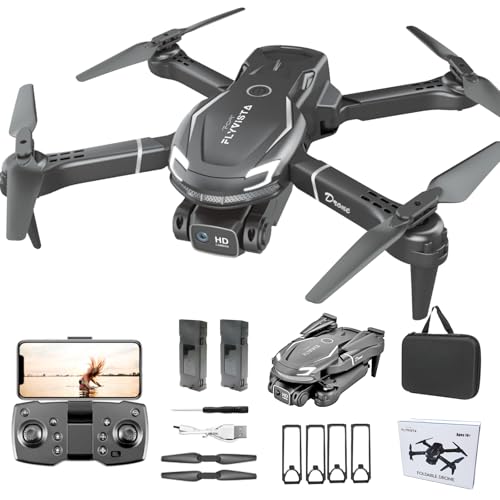 | Best for Flip Practice | Flight aids: Altitude hold; optical flow; one-key takeoff/landing | Controller type: Remote control and phone app | Takeoff weight: About 100 g | VIEW LATEST PRICE | Read Our Analysis |
More Details on Our Top Picks
BLINORY 2K Camera Drone
For new pilots who want practice and casual photos in one starter drone, this all-around pick combines useful flight aids with a camera. It has a 2K camera with an adjustable 90° lens, plus live FPV viewing through the BLINORY GO app. Altitude hold, optical-flow positioning, headless mode, and one-key takeoff and landing make basic flight easier. Two batteries provide up to 36 minutes total under ideal conditions, and the drone weighs under 250 g.
The X60 folds into its included carrying case, and propeller guards add protection during practice. Owners report simple setup and beginner-friendly controls, though some describe shaky control in slight wind. You can fly with the remote or phone app, but owners report BLINORY GO connection problems and video playback crashes.
Pros: Simple setup and beginner-friendly controls · The foldable design and included carrying case · Two batteries extend practice time.
Cons: Owner feedback describes camera quality as okay · Reviewer reports shaky control in slightly windy conditions.
Skip it if: you rely on app-based live viewing, as users report connection issues and playback crashes.
- Video resolution:2K
- Image stabilization:—
- Flight time:36 minutes total
- Flight aids:Altitude hold, optical flow, one-key takeoff/landing
- Controller type:Remote control and phone app
- Takeoff weight:Under 250 g
- Obstacle protection:Propeller guards included
- Photo resolution:—
PLEGBLE 4K Camera Drone
The PLEGBLE 4K Camera Drone pairs that bundle with brushless motors, optical-flow positioning and altitude hold to help it hover. At under 250 g, the foldable drone is easy to carry, and one-key takeoff and landing simplify basic control.
Setup and flying drew praise from one owner, who described both as easy. Headless mode and an out-of-range alarm at 328–393 ft add simple flight aids, while the three batteries mean you can rotate packs during a longer outing. One owner also praised the camera, but another said the drone stopped working after two days. That reported failure is a reason to weigh the convenience of the three-battery bundle against the single two-day failure report.
Cons: One review snippet said it stopped working after two days · No dependable independent owner-feedback sample found for broader complaint patterns.
- Video resolution:4K UHD
- Image stabilization:Optical-flow positioning; camera unstated
- Flight time:45 min total; 3 batteries
- Flight aids:1-key takeoff/landing; headless; altitude hold
- Controller type:Remote control
- Takeoff weight:Under 250 g
- Obstacle protection:—
- Photo resolution:3840×2160P; MP unstated
FPV LCD Screen Camera Drone
The phone-free FPV setup suits beginners who want live camera views without relying on a smartphone or app. Its camera angle adjusts remotely up to 90°, and electronic image stabilization (EIS) helps smooth video. Brushless motors pair with one-key takeoff and landing for beginner-friendly control.
Setup stays simple: fold the drone for carrying, then use the remote’s screen to view the live feed. Owners praise the easy setup, responsive controls, clear footage, and portable design.
One review source gives an effective range of 50 m, a practical limit for keeping the live view close by. The remote-adjustable camera angle makes it easy to change your framing mid-flight.
Pros: Owners praised the built-in screen for phone-free flying · Owners described setup and beginner controls as easy · Owners praised the foldable, lightweight design for portability.
Cons: One review source lists the effective range as 50 m · No owner-reported weaknesses were identified.
Skip it if: you need more than 50 m of effective range.
- Video resolution:1080p
- Image stabilization:EIS
- Flight time:—
- Flight aids:1-key takeoff and landing
- Controller type:Remote with built-in LCD
- Takeoff weight:145 g
- Obstacle protection:—
- Photo resolution:12 MP
Brushless Screen Remote Drone
Unlike the PLEGBLE 4K Camera Drone, the FAKJANK suits beginners who want a built-in screen remote and no phone connection. Its remote LCD live view puts the camera feed on the controller, while the camera tilts remotely up to 90°. Its foldable design and mentioned carrying bag make it easier to pack for outings.
Setup centers on the dedicated controller, with one-key start for getting airborne. In flight, you can adjust the camera angle from the remote instead of repositioning it by hand. The foldable frame packs away after flying, and each battery gives you up to 20 minutes of stated flight time.
The main limitation for filming is the 1080p ceiling: the PLEGBLE 4K Camera Drone offers a higher stated video resolution.
Skip it if: 4K matters to you; the camera records in 1080p HD.
- Video resolution:1080p HD
- Image stabilization:—
- Flight time:Up to 20 min per battery
- Flight aids:1-key start; other aids unconfirmed
- Controller type:Dedicated remote with built-in LCD
- Takeoff weight:<249 g claimed
- Obstacle protection:—
- Photo resolution:—
G3 HD Camera Drone
Beginners who want phone-free flying get simple controller playback with the G3 HD Camera Drone. Its controller shows 1080p live video and lets you review photos and videos without a phone; recording requires an SD card, which isn’t included. Headless mode, waypoint flight and gravity control add options, and the foldable drone is claimed to weigh under 249 g.
Two USB cables let you charge both batteries at once. The built-in screen removes the need for a phone during viewing and playback, but the separate SD card adds an item to your setup. The adjustable camera offers top-down or horizontal framing, and you can review captured footage directly on the controller.
- Video resolution:1080p
- Image stabilization:—
- Flight time:25 min total, 2 batteries
- Flight aids:Optical flow; one-key takeoff/landing
- Controller type:Remote with built-in screen; app
- Takeoff weight:Under 249 g claimed
- Obstacle protection:—
- Photo resolution:—
LCD Screen Camera Quadcopter
For beginners who want indoor practice, this quadcopter keeps live viewing phone-free with a screen remote. Four propeller guards help shield the blades around furniture and walls. Altitude hold, optical flow, headless mode, and one-key takeoff and landing make control easier. The remote has a 3-inch color screen, and the camera tilts manually up to 90 degrees.
The kit includes a carrying case, two Type-C cables and four spare propellers. Photos and videos save to a memory card up to 64 GB, but the card is sold separately. Three speed modes, flips and circle flights add options as your skills grow.
Its under-249 g takeoff weight and folding body make it easier to pack, while the screen remote lets you fly without a phone or app. Bring a memory card to record your practice flights.
Skip it if: you want to record video right away; the memory card is sold separately.
- Video resolution:—
- Image stabilization:—
- Flight time:15 min per battery
- Flight aids:Altitude hold
- Controller type:Dedicated remote with 3-inch screen
- Takeoff weight:<249 g
- Obstacle protection:4 propeller guards; no sensing stated
- Photo resolution:—
UHD Screen Controller Drone
A full-coverage propeller guard helps beginners protect the propellers during recreational flying, while the controller screen provides live viewing. Its adjustable-angle UHD camera supports outdoor filming, and brushless motors power the drone.
Two batteries come in the package, along with a carrying case. You can also connect a phone by Wi-Fi through the app, and the drone offers 3D flips.
Setup involves turning on the drone, connecting your phone to its Wi-Fi through the app, then using the app’s control interface to take off. You can instead view the live feed on the controller screen, without relying on the phone for viewing. The two-battery package gives you another battery for flying, but no flight-time figure helps you plan how long each outing may last. The included guard covers the propellers, and the case keeps the drone’s accessories together.
Pros: Listing includes two batteries · Controller has a screen for live viewing · Full-coverage propeller guard is listed.
Cons: No flight-time figure provided · No video or photo resolution specified.
- Video resolution:—
- Image stabilization:—
- Flight time:—
- Flight aids:Altitude hold; one-key start
- Controller type:Remote; controller screen; app
- Takeoff weight:0 lb
- Obstacle protection:Full-coverage propeller guard
- Photo resolution:—
Holy Stone Mini FPV Drone
Indoor FPV practice feels safer with protected propellers, optical-flow positioning, and altitude hold. Optical flow helps it hover, while three speed modes, headless mode, and trajectory flight add control options as skills grow.
Each battery provides up to 5 minutes of flight, so practice comes in short sessions. Gravity control, gesture capture, and 360-degree flips add extra modes. One owner reported that two batteries barely held charge, and a reviewer found the camera image less than sharp. Its protected, compact design is suited to indoor practice, not windy flights or cinematic footage.
Pros: Reviewers describe straightforward beginner controls · Steady everyday indoor flying · Three batteries included for practice.
Cons: One owner reported two batteries barely held charge · Reviewer says camera image is not very high resolution.
Skip it if: you plan to fly outdoors in wind or want cinematic footage.
- Video resolution:1080p, 20 fps
- Image stabilization:Optical-flow hover; no gimbal listed
- Flight time:Up to 5 minutes per battery
- Flight aids:Optical flow, altitude hold, one-key takeoff/landing
- Controller type:Remote controller and Wi-Fi app
- Takeoff weight:33 g
- Obstacle protection:Full 360° propeller guards
- Photo resolution:—
1080P Foldable Camera Drone
Gesture selfie, trajectory flight, basic follow, and gravity control join a 1080p camera with 90° tilt and FPV phone live view. Altitude hold, headless mode, one-key takeoff and landing, and three speed settings help you build control gradually. The remote also performs 360° flips, while propeller guards add protection during practice.
Fold the drone for storage and carry it in the included case. You can fly through the app or remote, but not both at once. The foldable design keeps it compact between flights.
Skip it if: you need long uninterrupted flights, since each battery lasts about 15 minutes.
- Video resolution:1080P HD
- Image stabilization:—
- Flight time:30 minutes total
- Flight aids:Headless, altitude hold, trajectory flight
- Controller type:Remote or app
- Takeoff weight:Under 249 g
- Obstacle protection:Propeller guards
- Photo resolution:—
FLYVISTA Cool Mini Drone
For beginners practicing flips indoors with phone-based 1080p FPV, the FLYVISTA Cool Mini Drone adds three speeds and 360-degree flip practice with basic hover help. Its camera tilts manually through 90 degrees, while phone-app live view lets you frame a shot as you fly. Altitude hold and bottom-camera optical flow help steady its position.
Choose the remote or phone app, then use one-key takeoff and landing to launch. Headless mode and four propeller guards make indoor practice more approachable, and two batteries provide about 20 minutes total of stated flight time. The app adds gravity sensing, gesture capture and path flight.
Owners describe it as easy to control, but some report drifting or control failures, and others say the camera image is weak. Its shark-shaped design keeps this mini quadcopter suited to indoor practice.
Pros: Owners describe it as easy to control · Some buyers say children enjoy flying it · An owner praised the manufacturer’s after-sales service.
Cons: Weak camera image quality · Some report short battery life.
Skip it if: image quality is a priority, as users report weak footage.
- Video resolution:1080P HD
- Image stabilization:—
- Flight time:20 minutes total
- Flight aids:Altitude hold; optical flow; one-key takeoff/landing
- Controller type:Remote control and phone app
- Takeoff weight:About 100 g
- Obstacle protection:Propeller guards included
- Photo resolution:—
Drones for Beginners with Camera: Key Specs Side by Side
Here is how the 10 picks line up on video resolution, flight time, flight aids, controller type and takeoff weight. Cells marked with a dash are specs the maker leaves out of its listing.
| Pick | Video resolution | Flight time | Flight aids | Controller type | Takeoff weight |
|---|---|---|---|---|---|
| BLINORY 2K Camera Drone | 2K | 36 minutes total | Altitude hold, optical flow, one-key takeoff/landing | Remote control and phone app | Under 250 g |
| PLEGBLE 4K Camera Drone | 4K UHD | 45 min total; 3 batteries | 1-key takeoff/landing; headless; altitude hold | Remote control | Under 250 g |
| FPV LCD Screen Camera Drone | 1080p | — | 1-key takeoff and landing | Remote with built-in LCD | 145 g |
| Brushless Screen Remote Drone | 1080p HD | Up to 20 min per battery | 1-key start; other aids unconfirmed | Dedicated remote with built-in LCD | <249 g claimed |
| G3 HD Camera Drone | 1080p | 25 min total, 2 batteries | Optical flow; one-key takeoff/landing | Remote with built-in screen; app | Under 249 g claimed |
| LCD Screen Camera Quadcopter | — | 15 min per battery | Altitude hold | Dedicated remote with 3-inch screen | <249 g |
| UHD Screen Controller Drone | — | — | Altitude hold; one-key start | Remote; controller screen; app | 0 lb |
| Holy Stone Mini FPV Drone | 1080p, 20 fps | Up to 5 minutes per battery | Optical flow, altitude hold, one-key takeoff/landing | Remote controller and Wi-Fi app | 33 g |
| 1080P Foldable Camera Drone | 1080P HD | 30 minutes total | Headless, altitude hold, trajectory flight | Remote or app | Under 249 g |
| FLYVISTA Cool Mini Drone | 1080P HD | 20 minutes total | Altitude hold; optical flow; one-key takeoff/landing | Remote control and phone app | About 100 g |
Choosing a Beginner Camera Drone
Video and photo resolution
Resolution tells you how many pixels a camera records, not how steady or clear the footage will look in motion. For a beginner, compare the stated video resolution and frame rate with how you plan to watch or share clips; a higher resolution can capture more image detail, but it doesn’t tell you whether footage will shake. A camera listed as 4K at up to 30 fps specifies both resolution and a maximum frame rate, while those figures alone don’t describe stabilization. The common mistake is choosing by the biggest resolution number and assuming it guarantees smooth footage.
Image stabilization
Look for the type of stabilization, not just a general claim that a camera is stabilized. A mechanical gimbal physically supports and steadies the camera, while electronic image stabilization, or EIS, processes footage to reduce shake; a drone can record 4K video with EIS without using a mechanical gimbal. The common mistake is treating 4K as a stabilization feature.
Flight time and batteries
Treat a manufacturer’s maximum flight time as a best-case rating, not a promise for every flight. The gap can matter in practice: owner reports for one drone describe roughly 20–25 minutes in ordinary or carefully managed use against a 31-minute manufacturer maximum. Battery count and a stated total can help you compare how much flying a package claims to support, but they don’t show how long one battery lasts or how much time you’ll get in your own conditions. Compare the per-battery rating with any advertised total, and avoid assuming that adding battery ratings guarantees uninterrupted flight time.
Flight aids and obstacle protection
Separate flight assistance from physical protection. GPS-assisted Return to Home can help a drone return automatically, while a dedicated button gives you a way to start that function; a Beginner Mode can also limit flight speed. These features describe help with returning or controlling the drone, not obstacle sensing.
Propeller guards are a separate feature, and their presence doesn’t establish that a drone can detect and avoid obstacles. The common mistake is reading “beginner-friendly” as a promise that the drone will prevent collisions or manage every risky situation.
Controller and live view
Choose a viewing setup that fits how you want to fly. A built-in controller screen keeps the live view on the controller; a phone-based setup uses your phone as the display. The display type tells you where you’ll view the camera feed, but it doesn’t by itself describe the camera’s resolution or stabilization.
A built-in screen may suit you if you prefer a single device for controls and viewing, while a phone-based setup may fit if you want to use your phone. The common mistake is treating a screen on the controller as proof of better video quality.
Takeoff weight and portability
Use stated takeoff weight, not folded size, to judge weight-related fit. One compact drone weighs 246 g at takeoff, while another weighs under 249 g; those are separate specifications from their camera and flight features. Compare takeoff weight with your needs.
A small or foldable design doesn’t establish the aircraft’s takeoff weight, and weight alone doesn’t tell you how well it will handle wind. The common mistake is assuming a compact drone falls under a weight threshold without comparing its takeoff figure.
Frequently Asked Questions
Does a drone under 250 g need FAA registration for recreational flying?
No, a drone weighing less than 250 g generally doesn’t need FAA registration when you fly it only for recreation. You still need to follow recreational flight rules, and registration applies if you fly for work or another non-recreational purpose. Check the drone’s takeoff weight, including its battery and any attached accessories.
Can beginners safely fly camera drones outdoors in windy conditions?
Yes, beginners can fly outdoors in mild conditions, but wind can make a lightweight drone harder to control and reduce its return-flight margin. Start in a sheltered area, keep the drone close, and land early if it struggles to hold position. Strong wind and headwinds call for postponing the flight.
How close is real-world drone flight time to the advertised maximum?
Real-world flight time is often shorter than the advertised maximum because the rating reflects ideal conditions. DJI Mini 4K owners report roughly 20–25 minutes in ordinary use, compared with its 31-minute manufacturer maximum; those reports are anecdotes, not controlled tests. Wind and the return flight can also affect usable airtime.
How long does it take to charge a beginner drone battery?
Charging time depends on the battery and charger, so compare each drone’s stated charging time rather than assuming one standard. For longer outings, spare batteries let you swap packs instead of waiting; the G3 HD Camera Drone, for example, includes two batteries and two USB cables for charging both at once.
What memory card should I use for recording drone video?
Choose a memory card that matches the drone’s recording format and supports its required speed, then format it in the drone before filming. For the G3 HD Camera Drone, recording requires a separate SD card, and you can review captured footage on its controller screen.
Conclusion
If you want a built-in screen for phone-free viewing, choose the FPV LCD Screen Camera Drone; if longer stated flight time matters more, consider the PLEGBLE 4K Camera Drone’s three-battery bundle. For a first pick, the best drone for beginners with camera depends on how you plan to fly and film. Decide whether you want a screen remote, app-based viewing, or more flight aids, then choose the model whose features match that priority.
Sources
- reddit.com (reddit.com)
- potensic.com (potensic.com)
- reddit.com (reddit.com)
- reddit.com (reddit.com)
- reddit.com (reddit.com)