
Must Have Drone Accessories for Every Pilot
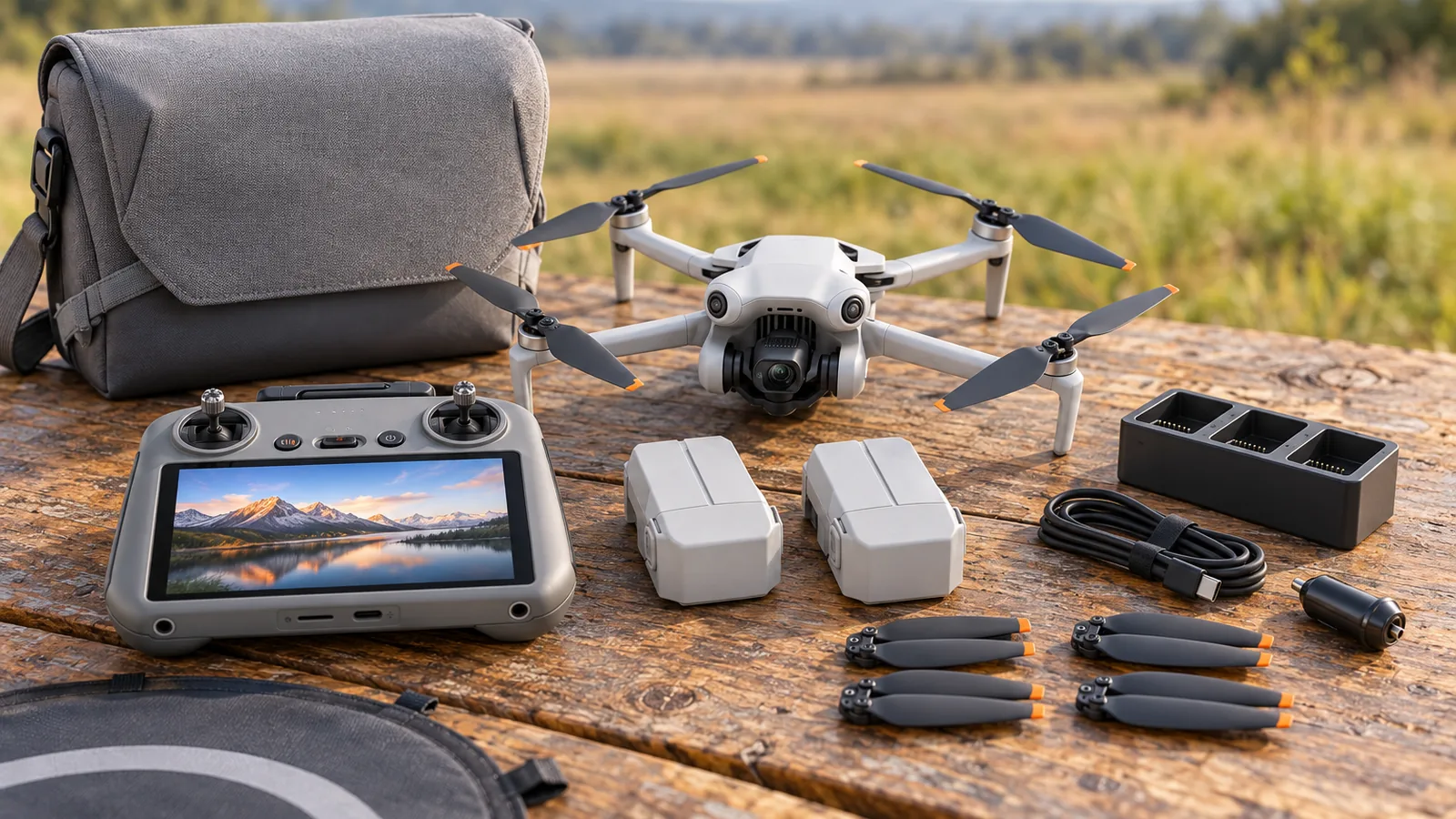
Must have drone accessories depend on your aircraft and flying needs; one DJI kit includes 3 Intelligent Flight Batteries. Before buying, check that each accessory fits your exact model, since compatibility can vary even between drone generations. Start with gear that solves a need on your next flight.
What are the must-have drone accessories?
Quick answer: There’s no universal kit: choose accessories that fit your exact drone and solve a need for your flights. For a basic kit, prioritize compatible spare batteries, charging gear, a carrying bag or storage protection, and spare propellers with a screwdriver. Add propeller guards for protection or ND filters for exposure control only when those options fit your aircraft and flying needs.
- More flying time: Carry compatible spare batteries and a charging hub; verify battery-series compatibility.
- Transport and storage: Choose a suitable bag and gimbal protector.
- Repairs: Keep spare propellers matched to your exact aircraft model.
- Optional protection: Check guard restrictions, since the Mini 4 Pro guard reduces flight life and disables obstacle avoidance.
- Image-making: Choose model-compatible ND filters for exposure control and long-exposure work.
Which accessories belong in a basic kit?
A useful basic kit covers spare power, charging, transport, and repairs, with protection or camera accessories added for specific needs.
- Extra batteries: Spare, compatible batteries give you more flying time before you need to recharge. DJI’s Mini 4 Pro Fly More Combo includes three Intelligent Flight Batteries, while the Mavic 3 Fly More Kit includes two batteries.
- Charging gear: A charging hub lets you recharge batteries, and a car charger can help on outings where you have access to a vehicle. DJI’s Mavic 3 kit includes a 100 W charging hub and a 65 W car charger; check that the charger supports your battery series.
- A carrying bag and storage protection: A bag makes it easier to carry your drone and accessories, while a gimbal protector helps protect the camera assembly during storage. Both are included in the Mini 4 Pro Fly More Combo.
- Spare propellers and a screwdriver: These can help you replace a damaged propeller. The Mini 4 Pro combo includes three pairs of spare propellers, 18 screws, and a screwdriver.
- Propeller guards: Consider these when you want protection from contact with external objects, but treat them as an optional accessory. On the Mini 4 Pro, guards reduce flight life and disable obstacle avoidance, so check the trade-off before flying with them.
- ND filters: These reduce incoming light for exposure control and long-exposure work. DJI’s Mini-series guidance lists ND16, ND64, and ND256 filters for strong-light conditions and long-exposure timelapse.
- A camera lens: A wide-angle lens is a specific image-making add-on, not a basic requirement. DJI states that its Mini 4 Pro wide-angle lens changes the stated photo field of view to 114°.
Use a bundle as an example of what a manufacturer groups together, not as a checklist every pilot needs. The right mix depends on what you’ll carry, how long you’ll fly, and which accessories fit your aircraft.
How do you check accessory compatibility?
Confirm compatibility in the manufacturer’s listing for the exact drone model and accessory, then check any restrictions on how you can use it. Accessories that look similar may fit different models or have different limits.
Match the accessory to your exact aircraft model. Check the product’s compatibility listing, including the model name and series. For example, DJI lists its Mini 4 Pro ND filter set for the Mini 4 Pro, while its Mini 3 Series set fits the Mini 3 and Mini 3 Pro.
Check the aircraft version and accessory listing together. A part’s fit depends on the specific aircraft, even within the same drone family. DJI lists the Mini 4 Pro wide-angle lens as compatible with the Mini 4 Pro in one listing, while a broader Mini accessory guide also lists the Mini 3 Pro. If listings differ, follow the listing for the specific accessory and confirm compatibility with the manufacturer before buying.
Match replacement parts and charging gear to their requirements. Spare propellers need to match the exact aircraft model. For a charging hub or charger, verify that it supports your battery series and meets the charger requirements.
Check restrictions that affect flight or battery use. The Mini 4 Pro propeller guard isn’t interchangeable with other listed models. On the Mini 4 Pro, it reduces flight time, disables obstacle avoidance and must not be used with the Intelligent Flight Battery Plus.
Verify travel rules for spare batteries. FAA guidance requires spare, uninstalled lithium batteries to travel in carry-on baggage, protected from damage and short circuits; airlines may set stricter limits, so check your carrier’s rules.
Important
A matching product name alone doesn’t confirm fit: check the individual accessory listing for your exact aircraft model.
What should you add for your flying needs?
Add accessories for the specific job you expect to do, and treat each as an optional upgrade rather than a universal essential.
For longer outings, extra compatible batteries and a charging hub can cut time spent waiting to recharge. DJI’s Mini 4 Pro Fly More Combo includes 3 batteries and a charging hub, while the Mavic 3 Fly More Kit adds 2 batteries, a 100 W hub and a 65 W car charger. Check that batteries and charging gear are listed for your exact drone before buying.
For transport, a fitted bag can keep the aircraft and small parts together, while a gimbal protector helps shield the camera assembly during storage. The Mini 4 Pro Fly More Combo includes both a shoulder bag and gimbal protector, but those bundle contents don’t make them standard accessories for every drone. Choose carrying and storage gear based on what your aircraft needs and how you plan to transport it.
For close-quarters flying, propeller guards can protect against contact with external objects, but they come with trade-offs. On the Mini 4 Pro, guards reduce flight life and disable obstacle avoidance, and DJI says not to use them with the Intelligent Flight Battery Plus. They’re an optional protection accessory, not a default choice for every flight.
For image-making, ND filters reduce incoming light for exposure control and long-exposure work. DJI’s Mini-series guidance names ND16, ND64 and ND256 filters for strong light and long-exposure timelapse. A wide-angle lens is another task-specific addition: DJI lists one for the Mini 4 Pro, and its stated photo field of view is 114°.
Spare propellers are useful replacements, but match them to the exact aircraft model. Before ordering any add-on, confirm its model compatibility; similar-looking drones can use different accessories.
Compare accessory types by purpose and fit
Accessory fit depends on the exact drone and battery series, so check each product’s compatibility listing before buying. Model-specific fit matters most for replacement parts, filters, lenses, and guards.
| Accessory type | Practical purpose | Fit check |
|---|---|---|
| Extra batteries | Extend outings by giving you charged batteries to swap in | Check compatibility with the aircraft and charging hub |
| Charging hub or charger | Recharge batteries between flights | Verify battery-series compatibility and charger requirements |
| Spare propellers | Replace damaged or worn propellers | Match them to the exact aircraft model |
| ND filters | Add a model-specific filter option for image-making | The Mini 4 Pro set is listed for that model; the Mini 3 Series set fits the Mini 3 Pro and Mini 3 |
| Wide-angle lens | Change the camera’s field of view | DJI lists the Mini 4 Pro lens for the Mini 4 Pro; a broader guide also lists it for the Mini 3 Pro |
| Propeller guard | Add protection around propellers | The Mini 4 Pro guard isn’t interchangeable with other listed models and can’t be used with the Intelligent Flight Battery Plus |
| Bag or gimbal protector | Carry or protect the aircraft and gimbal during storage | Check the specific kit or model listing |
DJI’s accessory listings and guidance support these categories and fit checks; the examples show why compatibility needs checking item by item.
A battery that fits may still affect performance or weight: the Mini 3 Pro battery reduces the Mini 4 Pro’s propulsion performance and flight time, and pushes its total weight above 249 g.
Frequently Asked Questions
Should I buy a drone accessory kit or choose accessories separately?
Choose a kit if its included parts match your aircraft and the way you fly; buy separately when you need only a few specific items. Kits can bundle batteries, charging gear, a bag, and repair parts, but accessory fit is model-specific, so check every item against your exact drone before purchasing.
Are third-party drone accessories safe to use?
They can suit your aircraft if they’re designed for your exact model and meet its requirements. Check the accessory’s compatibility and any limits on use. For chargers and hubs, verify battery-series compatibility and charger requirements.
How should I store drone batteries between flights?
Store batteries according to the manufacturer’s instructions for your specific battery, and protect them from damage. For air travel, keep spare, uninstalled lithium batteries in your carry-on baggage and protect them against short circuits; airline limits may be stricter, so check your carrier’s rules before you leave.
How often should I replace drone propellers?
Replace a propeller when it’s damaged or worn, and use a replacement made for your exact aircraft model. Keep compatible spares and the needed repair tools with your gear if you want to handle a replacement away from home; spare propellers must match your model.
What accessories do I need for long-distance drone trips?
For longer outings, bring compatible spare batteries and a charging hub to spend less time waiting to recharge. Add a car charger if you’ll have access to a vehicle, and choose a carrying bag that fits your aircraft and gear; verify battery and charger compatibility before packing.
Conclusion
Choose accessories by the problem you need to solve: if you fly longer, prioritize compatible batteries and charging gear; if you carry your drone often, choose a bag and storage protection; if you need protection or image control, consider guards or filters after checking their trade-offs. Before ordering, open the listing for your exact aircraft model and confirm fit. Start with one accessory that addresses your next flight, then add others only when your needs justify them.
Sources
- Buy DJI Mini 4 Pro – All-in-One Mini Camera Drone (store.dji.com)
- dji.com (dji.com)
- store.dji.com (store.dji.com)
- store.dji.com (store.dji.com)
- store.dji.com (store.dji.com)
- repair.dji.com (repair.dji.com)
- repair.dji.com (repair.dji.com)
- store.dji.com (store.dji.com)
- faa.gov (faa.gov)
